Malware analysis techniques
Basic static analysis - the process of extracting information without looking at the executable code, such as noticing that the hash value differs or the data size differs.
Advanced static analysis - disassembly, e.g. IDA
Basic dynamic analysis - removing traces of infection after running the malware, and building signatures
To put it simply, running the binary in a virtual environment.
Advanced dynamic analysis - analysis with a debugger
Malware types
Backdoor - a virus left behind during the initial attack for the purpose of continuously connecting to the target PC.
Botnet - to put it simply, it lies dormant on the target PC and is built to receive and execute the attacker's commands. The attacker's commands are received from a C2 server.
Downloader - a malicious binary that the attacker delivers to the target PC and, "once it gains access rights," makes it download a program for a secondary attack.
Information-stealing malware - malware for exfiltrating information from the target PC. Examples include sniffers, password hash collectors, and keyloggers.
Launcher - a malicious program used to run other malicious programs. Generally, for the purpose of gaining higher privileges or hiding, it does not carry the actual payload directly but forces a separate execution stage.
Rootkit - backdoor + downloader
Scareware - malware that frightens the user with fake warning screens to extort money or personal information.
Worm/virus - malware that replicates itself to infect additional systems.
Initial triage
Binary search: it might already be a known virus. So first scan it with something like VirusTotal. And in some challenges, while solving a forensics problem, I have found a binary in the antivirus quarantine space while searching for a binary in an email.
Hash comparison: to distinguish a normal program from malware, compare hashes. If the values differ, it is likely to have been tampered with.
String search: within a program, things like URLs are all stored as strings. Using the Strings program, you can search for strings stored in ASCII or Unicode format.
(MS uses the term Wide Character String for Unicode.)
ASCII : ex) BAD(\x42\x41\x44\x00)
UNICODE : ex) BAD(\x42\x00\x41\x00\x44\x00\x00\x00)
You can often obtain meaningful information; for one, you can infer the system from error messages.
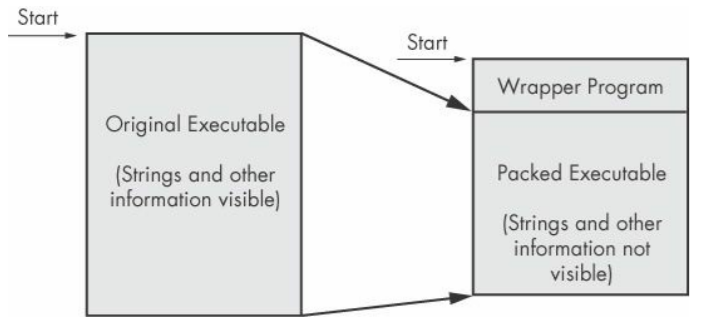
Packing: packed and obfuscated code contains at least the LoadLibrary and GetProcAddress functions, which are used to access the loading of additional functions.
When you run a packed program, a small wrapper program decompresses the packed file and then runs the unpacked file. When you statically analyze a packed program, you can only analyze the small wrapper program.
A few common DLLs seen during analysis
Kernel32.dll - a DLL containing core information such as kernel information (memory, file, and hardware access/manipulation).
Advapi32.dll - using this DLL, you can access additional core Windows components such as the service manager and the registry.
User32.dll - it contains all of the user interface components, such as buttons, scrollbars, and components that control and react to user actions.
Gdi32.dll - it contains functions related to graphics.
Ntdll.dll - the Windows kernel interface. It is always imported indirectly through Kernel32.dll, but an executable generally cannot import this file directly.
If an executable imports this file, it means the author is not using it as a function normally permitted for Windows programs. They use this interface for specific tasks such as hiding functionality or manipulating processes.
WSock32.dll - a networking-related DLL.
Wininet.dll - it contains application-layer network functions such as FTP, HTTP, and NTP.
*** Function naming conventions ***
In Windows, you can see function names ending in Ex, such as CreateWindowEx. MS created these to resolve compatibility between newly updated functions and existing functions: when a new function has the same name as an existing one, Ex is appended. Very importantly, for a function that has been updated twice, the Ex suffix is appended twice.
And also, for functions like CreateMessageBoxA or W, a suffix is appended for the version of the function that takes string arguments, where
A is an ASCII string and W is a Wide Character String (UNICODE) string.
PotentialKeylogger.exe
I could not analyze the binary. This is because the original binary file was not provided.
To summarize the contents of PotentialKeylogger.exe, let us focus on the functions that are most interesting from a malware analysis perspective.\
Among the Kernel32.dll functions, the process creation/manipulation functions (OpenProcess, GetCurrentProcess, GetProcessHeap) and the FindFirstFile, FindNextFile functions are used when searching through a directory.
There are quite a lot of User32.dll functions; the many GUI manipulation functions (RegisterClassEx, SetWindowText, ShowWindow) suggest that the program is likely to have a GUI (even if a GUI is not strictly necessary for the user).
SetWindowsHookEx is commonly used in spyware and is the most popular method a keylogger uses to capture keyboard input. In the case of malware, this function lets us suspect that keylogging is present.
The RegisterHotKey function also deserves attention. It registers a hotkey so that whenever the user presses a shortcut key combination, it can be delivered to the application. An application could let the user activate it through a currently active shortcut key.
GDI32.dll, as mentioned above, is a graphics-related DLL, and confirms that the program has a GUI. Shell32.dll means that this program can run other programs, a capability that is common to both malware and legitimate programs.
Advapi32.dll tells us that the program uses the registry, which means we should search for strings like registry keys. In this case, you can find the string Software\Microsoft\Windows\CurrentVersion\Run, which is the registry key that controls automatic execution on Windows boot.
There may also be executable exports; for example, functions like LowLevel(Keyboard/Mouse)Proc are defined as callback functions of SetWindowsHookEx. In the case of these export functions, since they were named the same as in the MSDN documentation, we could obtain information. Through static analysis of the import and export functions, we could draw important conclusions or form hypotheses.
One is that it may be a local keylogger that records keystrokes using the SetWindowsHookEx function, and we can infer that it uses a GUI visible only to a specific(?) user, that it registers a shortcut key with RegisterHotKey, and that the attacker accesses the keylogger GUI to view the recorded key values.
Furthermore, from the fact that there are registry functions and Software\Microsoft\Windows\CurrentVersion\Run, we can guess that it registers itself for automatic startup.